Learn to set up AI that runs your real estate day.
We teach agents to set up AI that prepares their follow-up, lays out their day and keeps deals moving. Taught by a working agent, using the same setups he runs on live deals. It drafts. You send.
- Taught by a working agent
- Step by step, made for non-tech agents
- Claude and ChatGPT

The setups we teach.
The same systems we run in a working real estate business, taught so you can build them on your own account.
Your AI, set up right
Your account, your voice and sales style, and the systems you use every day, taught to your AI one step at a time.
Follow-up and your day, prepared
Scheduled runs that read your email, calendar and CRM, rank who needs an answer, draft each reply and lay out your day.
Listings, buyers and the back office
Client dashboards, CMAs, newsletters, transaction files and social posts, prepared for you to review.
What a morning run looks like once it is set up.
- Reads the email, calendar and systems your setup connects
- Ranks who needs an answer first
- Drafts each reply in your voice
- You approve, edit or skip each one
- You send it from your own email or phone
Claude prepares. You approve. You send. Nothing leaves without your click.
Learn it your way.
Start free, go at your own pace, or learn it live with us. Training is priced on your call.
Self-paced video course
Follow along at your own pace, from basic setup to an AI that drafts your lead follow-up.
Join the waitlistLive training and workshops
A live class for you or your whole office. Watch a real morning run, then build your own.
See trainingCoaching
Hands-on sessions on your own account, with questions answered between calls.
See coachingConsulting
For teams and brokerages: where your agents lose time, which AI fits each job, and a rollout plan.
See consultingRather have it set up?
We build it with you on your own account, custom to your business.
See setupsSee what you will learn to build.
Short demos of the systems we teach and set up, built in the agent's brand, around the tools they already use.
Demos use made-up names, listings and addresses. Yours is built from your own business.
More examples.
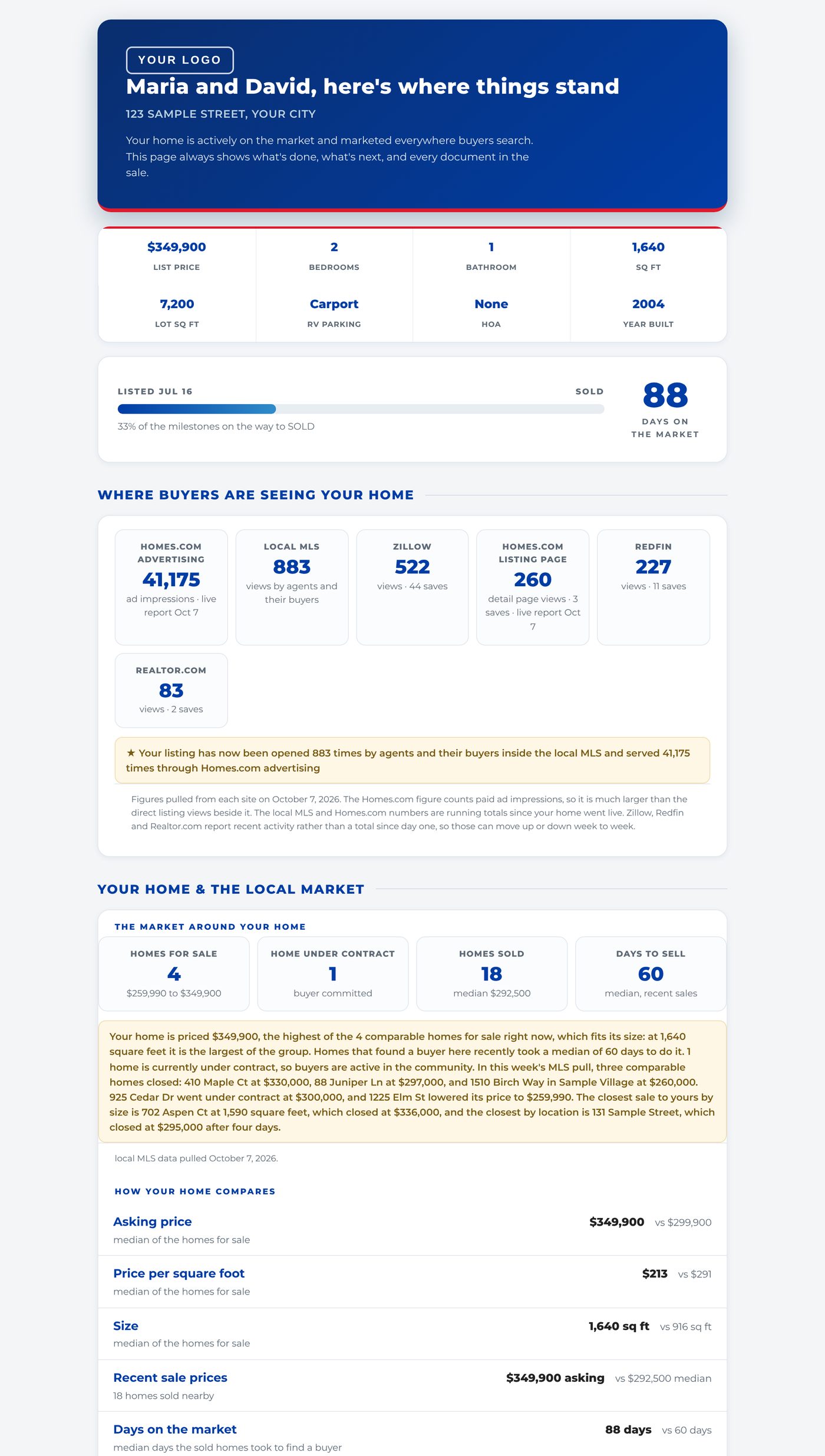
Demo versions of what our system produces, rebuilt with a made-up listing, sample numbers, stock photos and a placeholder brand. Yours are built in your brand, from your own deals. Tap any one to see it full size.
One week in a working agent's business.
Unlike the demos above, this is real output from our founder's own system, the week of October 5, 2026. Names, addresses and some numbers are changed. That setup reads more systems than a typical Core setup. What yours reads depends on what we connect.
Referred by an out-of-state agent. March 16, Alan: "I will be more than happy to do that" about a review. No review found. Laura came back as a home-value lead June 21.
"Just a simple check in text, hey how are things, hope everyone and everything is well."
Hey Alan, how are things? Hope you, Laura and everyone are doing well and the house is treating you right.
Josh
Recorded Friday about 3:05 PM. Missed the 2 PM wire cutoff, so disbursement and commission are expected today.
Open: septic report to the buyer, confirm commission landed.
Closed with title this morning.
Open: swing by with the closing gift.
Photo shoot today 9:30 to 11:25. Load photos and submit Wednesday 12:30. Coming Soon goes live Wednesday.
Open house Saturday, 10 to 12.
Rather have it set up for you?
We build it with you, custom to your business and priced on your call. After that it runs on your own Claude plan. Support and add-ons are optional.
- Setup on your own Claude account over screen share. You sign in to each system yourself.
- A voice profile built from your own sent emails
- A morning follow-up run: who needs an answer, ranked, with replies drafted
- Day and week plan drafts built around your calendar
- A weekly review of open items
- A week board for your open items, with text notes on each one. File attachments are not available yet.
- A 14 day check-in to tune it
- Your Claude plan. Required. A paid plan on your own account, billed by Anthropic.
- Ongoing support. Optional. A Care or Partner plan, below.
- Add-ons. Optional. Listing, Buyer and Back Office systems, priced on your call.
- Other subscriptions. Only if an add-on needs one, like an AI video plan or a phone line. Billed by that provider.
Your Claude account, your files and the routines we set up stay with you. They live on your account, not ours. Software changes, so routines need occasional upkeep. Without support, that upkeep is yours.
How setup works
- Free 20-minute call. We go over the systems you use and confirm what can connect.
- Start your Claude plan. On your own account, paid directly to Anthropic.
- Setup on screen share. One or more sessions, depending on what we connect. You sign in to each system yourself.
- 14 day check-in. We tune anything that is not working the way you want.
What you need, and good to know
- A Mac or Windows computer, on with the Claude app open when your routines are scheduled
- The Claude desktop app and a paid Claude plan
- Google Chrome, for systems that only work in a browser
- Your own sign-in for each system we connect
- The scheduled routines in your setup (the morning follow-up run, the day plan and the weekly review) run from the Claude desktop app. If your computer is off or the app is closed at run time, that run waits.
- Gmail and Google Calendar connect most directly. Other email, texting, CRM, MLS and transaction platforms vary, and some limit or block AI access. We check yours on the call.
- It drafts and organizes. It does not send, sign or submit anything for you.
- AI makes mistakes. You review everything before it goes out.
Optional support: Care and Partner plans
Monthly support for the workflows in your setup. No long-term commitment needed to use what you have.
- Fixes when a routine from your setup stops working
- Updates when Claude or a connected system changes
- One check-in call a month: how it is running and your questions
- Everything in Care
- A monthly tune-up session in place of the check-in: hands-on changes to your routines, drafts and voice, on screen share
- One new workflow each quarter, scoped on the call
Support covers the workflows set up for you. Send requests by text or email. They are handled in the order received, with no guaranteed response time. New add-ons and third-party subscriptions are not included.
Add-on packs.
Grouped into three packs. Each needs the Core setup. Open a pack to see what is in it.
LISTING PACKWin and market listingsClient Dashboards, Listing Launch Kit, Listing Presentation
Client Dashboards RUNNING ON LIVE DEALS
A page for each listing your sellers can check, refreshed weekly, plus the weekly seller update email drafted for you to send. A buyer version shows where a purchase under contract stands. See examples
Listing Launch Kit RUNNING ON LIVE DEALS
A home value report for the listing appointment. MLS remarks checked against the facts and fair housing guidelines. Walkthrough video, Just Listed reel, and open house flyers and posts from your listing photos. Videos need your own AI video plan. See examples
Listing Presentation
Your listing presentation rebuilt in your brand, plus a version filled with the home, the comps and your plan for each appointment.
BUYER PACKGuide buyers to the offerBuyer Presentation, Tour Coordinator, Offer Package, Buyer and Seller Packets
Buyer Presentation
A branded buyer consultation that walks clients through the process, the market and what to expect.
Tour Coordinator
Showing routes and stop times drafted for you, with branded tour packets for you and your buyers.
Offer Package RUNNING ON LIVE DEALS
Purchase offers drafted on your state's contract where your forms and transaction platform allow it. We run it on Arizona forms. Other states are confirmed on the call. Seller net sheets for offers your sellers receive. You review and sign. See an example
Buyer and Seller Packets
A branded buyer packet and seller packet built from your process: what to expect, timelines, checklists and who to call.
BACK OFFICE PACKKeep deals and contacts cleanTransaction Workflow, CRM Optimization, File Organizer
Transaction Workflow RUNNING ON LIVE DEALS
Deal folders built and kept current from the email, files and platforms your setup connects. Documents found on request, dates tracked, deal parties added to your contacts. Not a person and not a licensed transaction coordinator. More
CRM Optimization
A cleanup of the CRM you already use: tags, stages and campaigns rebuilt so leads get worked, where your CRM allows it.
File Organizer
Your downloads folder sorted into the right folder by client and deal.
Also available, priced on your call: Branded Forms and Docs, AI Answering Line (inbound only, tells callers it is an AI), Agent Website, AI Jumpstart, and a Team Package for teams and brokerages.
Common questions.
Do I need to be good with tech?
No. Every video, class and session is built for agents, not tech people, and goes step by step. If you would rather not do it yourself, we can set it up with you.
Which AI do you teach?
Claude, ChatGPT, Gemini and Grok. We run our own daily system on Claude and use the others for design, video and research. On the call we look at what you already use.
Will it send anything without me?
No. Every setup is prepare-only. Claude drafts and organizes. You review, approve and send from your own email or phone.
Do you need my passwords?
No. You sign in to each system yourself during setup.
What do I pay for besides the setup?
Your own paid Claude plan, billed by Anthropic. Support, add-ons and any other subscriptions an add-on needs, like an AI video plan or a phone line, are optional and listed separately. We go over which Claude plan fits on the call.
What does it work with?
Gmail and Google Calendar connect most directly. Other email, texting, CRM, MLS and transaction platforms vary. Some limit or block AI access. We check each system you use on the call, and your setup only reads what it can reach with your own sign-in.
Does my computer need to be on?
For the scheduled routines in your setup, yes. The morning follow-up run, the day plan and the weekly review run from the Claude desktop app, so your computer needs to be on with the app open at their scheduled times. Systems that only work in a browser also need Chrome.
What happens if I stop support?
You keep your Claude account, your files and the routines we set up. They live on your account, not ours. If Claude or a connected app changes, a routine may need updating. You can fix it yourself, book a 1-on-1 hour, or start a Care or Partner plan.
Is the transaction add-on a transaction coordinator?
No. It keeps deal files organized, tracks dates and finds documents for you. It is not a person and not a licensed transaction coordinator, and you stay responsible for deadlines and compliance.
I already use ChatGPT. Do I have to switch?
No. We build the daily system on Claude because that is what we run and have tested on live deals. Other AI tools may offer similar features, but we have not tested this workflow in them. ChatGPT, Gemini and Grok can stay in your toolkit. We use them for design, video and research.
Request a free 20-minute call.
AI for Agents Co. was founded by Josh Bernal, a full-time residential real estate agent. We built this system inside a working real estate business first, and we run it on live deals every day.
- We go over your systems and where you lose the most time
- We tell you whether training, coaching or a done-for-you setup fits
- Pricing is set on the call

Free 20-minute call
A short form. No prep needed. We will call or text you to set a time.
Request a free 20-minute callOr call (520) 251-9408